
Custom API Integration
Connect your AI chatbot to any external API. Fetch data, create records, trigger webhooks—integrate with your custom systems.
What Is Custom API Integration?
Custom API integration lets your AI chatbot connect to any REST API or webhook. You can fetch real-time data like inventory levels, create records in any system, trigger automations, send notifications, or integrate with proprietary business systems.
Basic setup can be done through our visual interface by configuring endpoints and parameters. For more complex integrations involving data transformation or conditional logic, some technical knowledge may be helpful.
API Capabilities
GET Requests
Fetch order status, account info, inventory levels, pricing.
POST Requests
Create tickets, leads, orders, submissions—any record.
Webhooks
Trigger workflows in Zapier, Make, n8n, or your backend.
Authentication
API keys, OAuth, bearer tokens, custom headers.
Response Mapping
Parse JSON responses and use data in bot messages.
Error Handling
Graceful fallbacks when APIs fail or timeout.
See It In Action
In this example, the chatbot calls a weather API to look up current conditions when a visitor asks “What’s the weather in Denver?”

Step-by-Step Setup
Go to AI Chatbot Settings → AI Actions and click Add Action. Configure the fields below to connect your API.
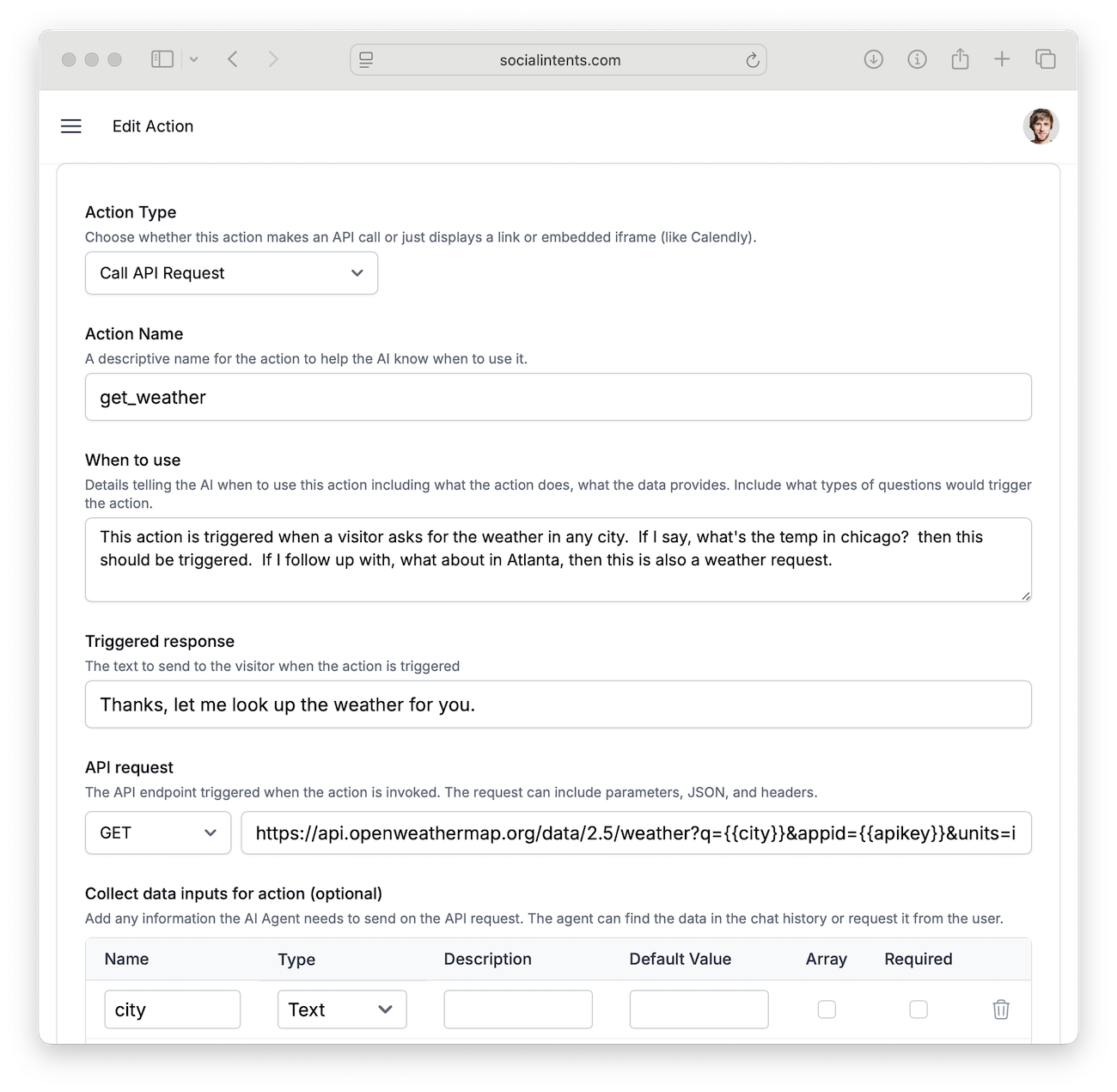
| Field | Description | Example |
|---|---|---|
| Action Type | Choose Call API Request to make an HTTP call when the action fires. |
Call API Request |
| Action Name | A unique function name. Use snake_case. | get_weather |
| When to use | Natural-language description of when the AI should call this API. | When the user asks about current weather conditions |
| Collect data inputs | Data to gather before calling the API. These become {{variable}} placeholders in the URL. |
city, apiKey |
| API URL | The endpoint to call. Use {{variable}} template syntax to inject collected data. |
https://api.openweathermap.org/data/2.5/weather?q={{city}}&appid={{apiKey}} |
| HTTP Method | GET for retrieving data, POST for sending data. | GET |
| Headers | Optional HTTP headers (e.g., Authorization). One per line in Key: Value format. |
Authorization: Bearer sk-xxx |
Example Use Cases
Weather Lookup
Let visitors ask “What’s the weather in Denver?” and get a live answer.
GET https://api.openweathermap.org/data/2.5/weather
    ?q={{city}}&appid={{apiKey}}&units=imperial
Order Status
Visitors provide an order number, the chatbot calls your order API and returns the status.
GET https://api.yourstore.com/v1/orders/{{orderId}}/status
Headers:
  Authorization: Bearer {{apiToken}}