
Cal.com Integration
Let your AI chatbot book Cal.com meetings automatically. Open-source scheduling that works seamlessly with your chat widget.
What Is Cal.com Integration?
Cal.com is an open-source scheduling platform similar to Calendly. Integrating it with your AI chatbot lets visitors book meetings directly in chat conversations.
Cal.com offers self-hosting options and more customization for privacy-conscious businesses. When your AI chatbot detects scheduling intent, it displays your Cal.com booking widget within the chat.
Why Cal.com?
Open Source
Full transparency and community-driven development. No vendor lock-in.
Cost Effective
Generous free tier and affordable paid plans. Self-host for free.
Self-Hostable
Keep your data on your servers. Perfect for privacy-focused teams.
How Cal.com Booking Works
Connect your Cal.com account
Link your Cal.com account in the AI Actions settings.
Configure event types
Choose which meeting types to offer visitors.
AI detects booking intent
The chatbot recognizes when a visitor wants to schedule a meeting.
Meeting booked automatically
Visitor selects a time and the meeting is created in your calendar.
Cal.com vs Calendly
| Feature | Cal.com | Calendly |
|---|---|---|
| Open Source | ✓ Yes | ✗ No |
| Self-Hosting | ✓ Available | ✗ Not available |
| Free Tier | ✓ Generous | ✓ Limited |
| Chatbot Integration | ✓ Supported | ✓ Supported |
Step-by-Step Setup
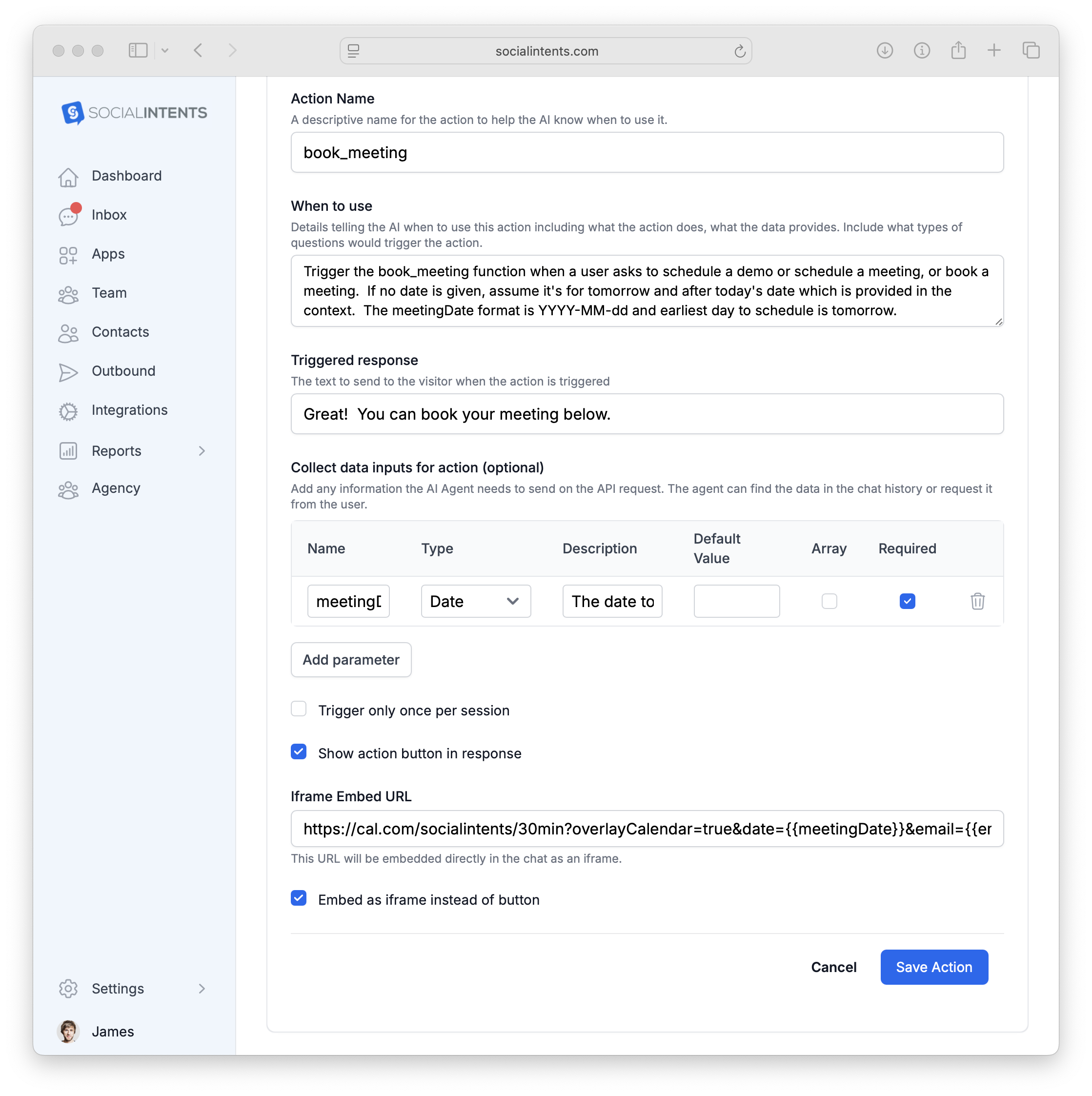
Go to AI Chatbot Settings → AI Actions and click Add Action. Configure the fields below to embed Cal.com scheduling in your chat widget.
| Field | Description | Example |
|---|---|---|
| Action Type | Choose Show Button or iFrame Only to embed the scheduler directly. |
iFrame Only |
| Action Name | A unique function name the AI will call. | show_cal_scheduler |
| When to use | Describe when the AI should show the scheduler. | When the user wants to schedule a meeting or call |
| Collect data inputs | Data to pre-fill in Cal.com (email, name, preferred date). | email, name, meetingDate |
| iFrame URL | Your Cal.com event link with query parameters for pre-filling visitor info and overlay calendar. | https://cal.com/youraccount/30min?overlayCalendar=true&date={{meetingDate}}&email={{email}}&name={{name}} |
| iFrame Height | Set the height of the embedded scheduler in pixels. | 600 |
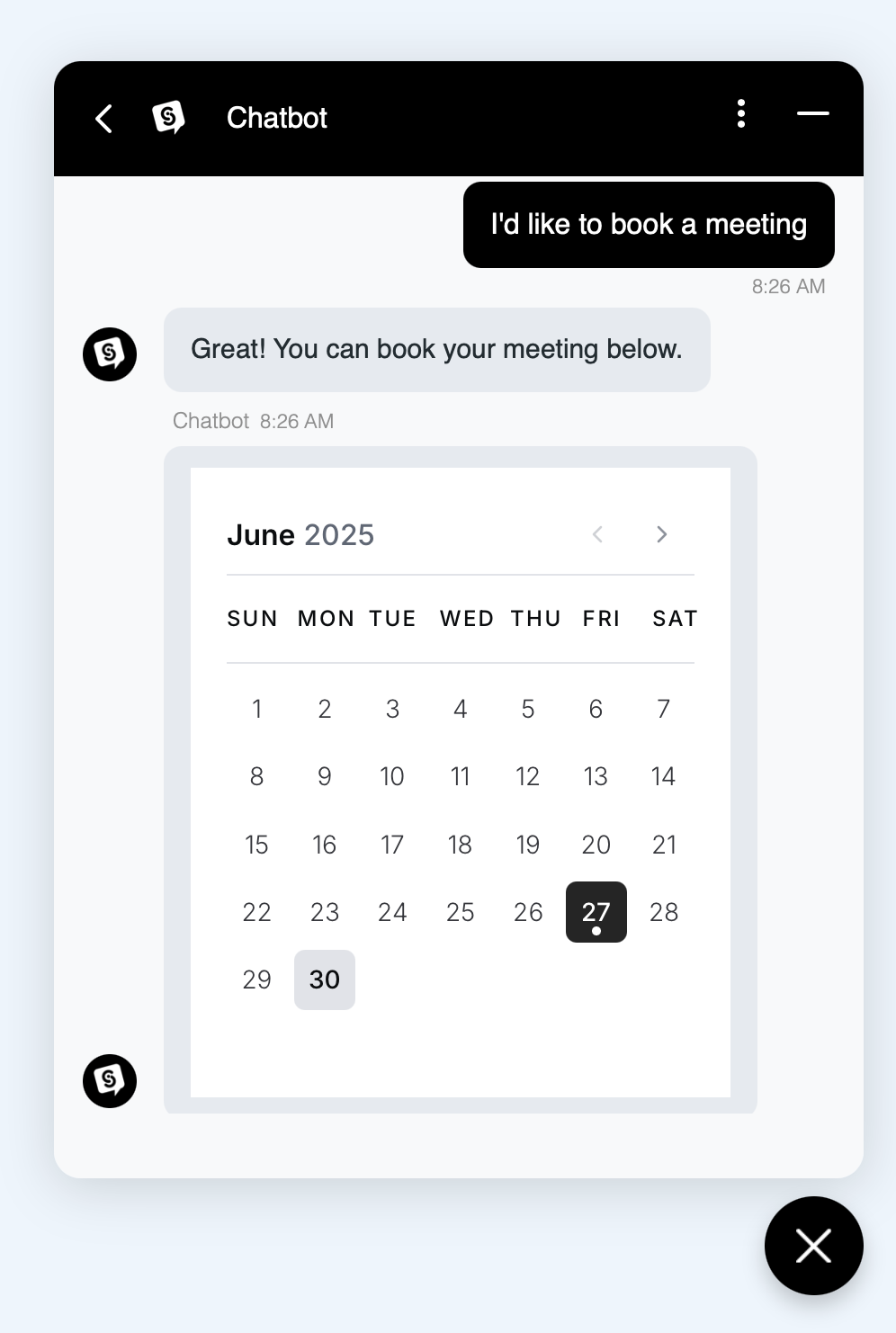
How the Chatbot Flow Works
Visitor asks to schedule a call
The AI detects scheduling intent and begins collecting the required inputs (name, email, preferred date).
Cal.com scheduler embeds in chat
Once inputs are collected, the Cal.com scheduling iframe loads inside the chat widget with the visitor’s info pre-filled.
Visitor picks a time and confirms
The visitor selects an available slot and completes the booking—all without leaving the chat window.
More AI Actions
Book Meetings with Cal.com
Connect your open-source scheduler to your AI chatbot.
14-day free trial. No credit card required.