
Calendly Integration
Let your AI chatbot book Calendly meetings automatically. When visitors want to schedule a call, the bot presents your availability right in the chat widget.
What Is Calendly Integration?
The Calendly AI Action lets your chatbot automatically display scheduling options when visitors want to book a meeting. Instead of redirecting them to a separate page, the Calendly widget appears directly within the chat conversation.
Your AI chatbot can qualify leads first, asking questions about their needs before offering to schedule a call. This ensures only qualified prospects get on your calendar, improving conversion rates and sales efficiency.
How Calendly Booking Works
Connect Calendly
Link your Calendly account in AI Actions settings.
Set Triggers
Define when the bot should offer scheduling.
AI Detects Intent
Bot recognizes when visitor wants to book.
Meeting Booked
Visitor picks a time, meeting created.
Calendly Integration Features
Inline Scheduling
Calendly widget appears directly in chat. Visitors never leave your site.
Multiple Event Types
Offer 15-min calls, 30-min demos, or 1-hour consultations based on context.
Real-Time Availability
Shows your actual available slots from Calendly in real-time.
Automatic Confirmations
Calendly sends confirmation and reminder emails automatically.
Perfect For
Sales Teams
Book product demos automatically when prospects are interested.
Consultants
Let visitors book discovery calls while browsing your services.
Healthcare
Schedule patient consultations and follow-up appointments.
See It In Action
A visitor asks to schedule a demo. The chatbot collects their name and email, then opens the Calendly scheduling widget right inside the chat.

Step-by-Step Setup
Go to AI Chatbot Settings → AI Actions and click Add Action. Configure the fields below to embed Calendly in your chat widget.
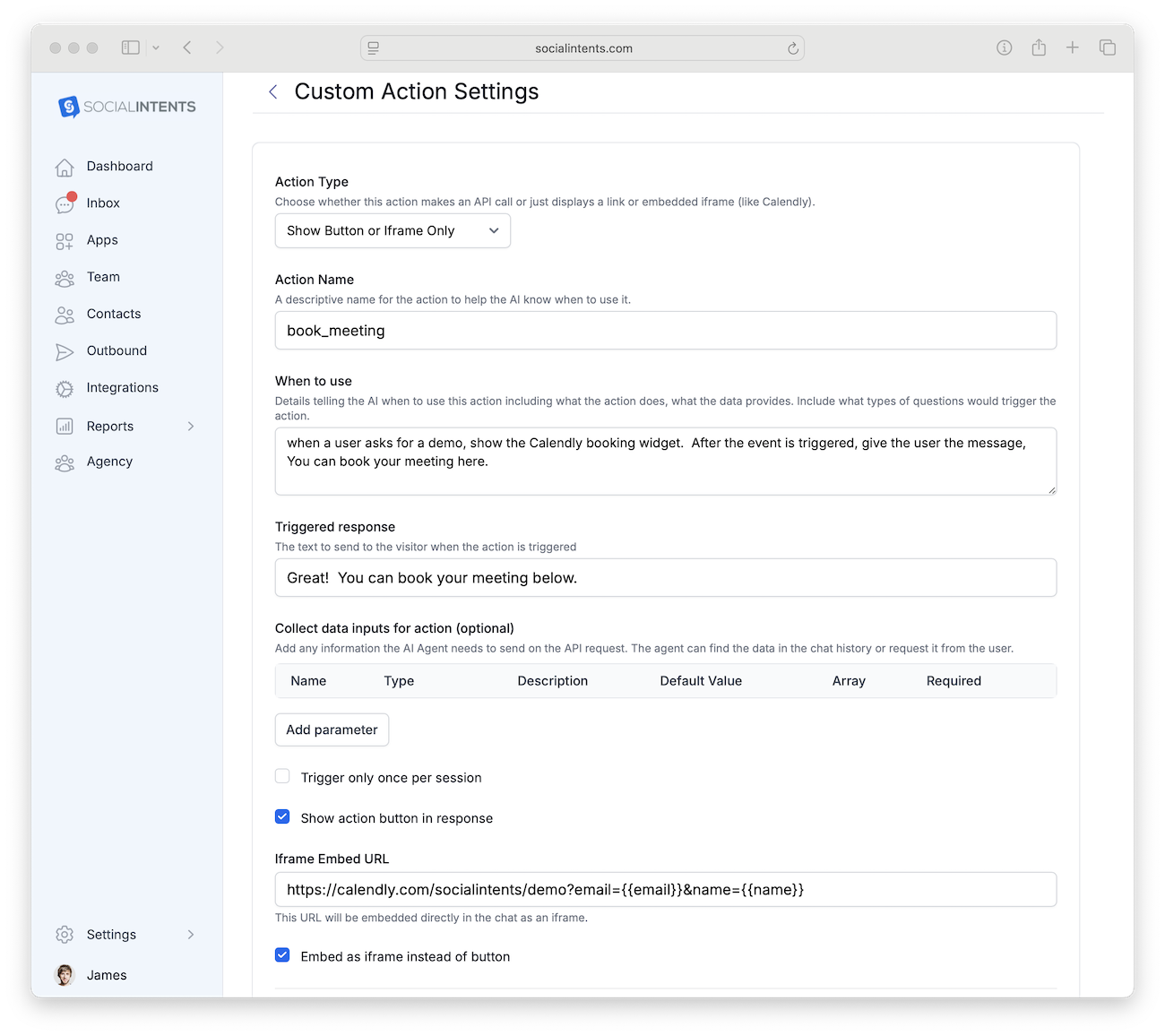
| Field | Description | Example |
|---|---|---|
| Action Type | Choose Show Button to display a scheduling button, or iFrame Only to embed the scheduler directly. |
Show Button or iFrame Only |
| Action Name | A unique function name the AI will call. | show_calendly_scheduler |
| When to use | Describe when the AI should show the scheduler. | When the user wants to schedule a meeting or demo |
| Collect data inputs | Data to pre-fill in Calendly (name, email). | email, name |
| iFrame URL | Your Calendly event link with query parameters to pre-fill visitor info. | https://calendly.com/yourcompany/demo?email={{email}}&name={{name}} |
How the Chatbot Flow Works
Visitor asks to book a meeting
The visitor says something like “Can I schedule a demo?” The AI detects the scheduling intent.
AI collects name & email
The chatbot asks for the visitor’s name and email so Calendly can pre-fill the booking form.
Calendly scheduler appears in chat
The Calendly iframe loads directly inside the chat widget. The visitor picks a time slot and confirms—all without leaving the chat.
More AI Actions
Start Booking Meetings Automatically
Connect Calendly and let your AI chatbot schedule calls 24/7.
14-day free trial. No credit card required.